
TikTok Video Downloader
Download TikTok videos without watermark - Fast & Easy
How to use:
- Open TikTok and find the video you want
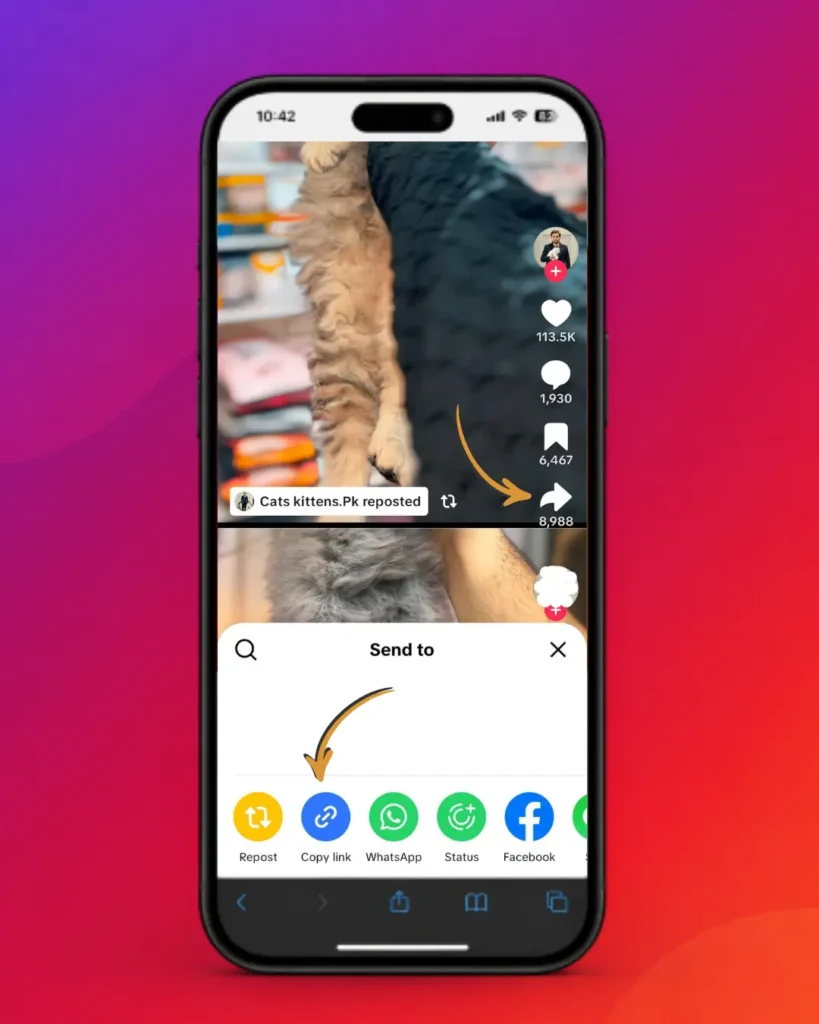
- Click "Share" and copy the link
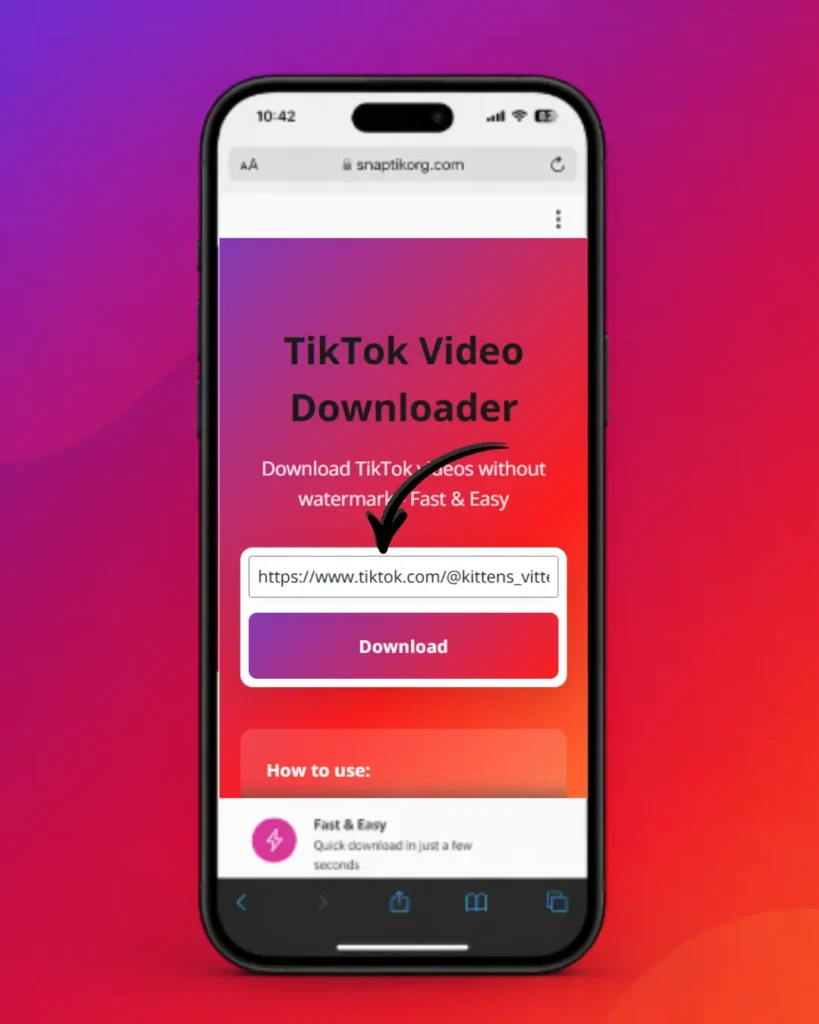
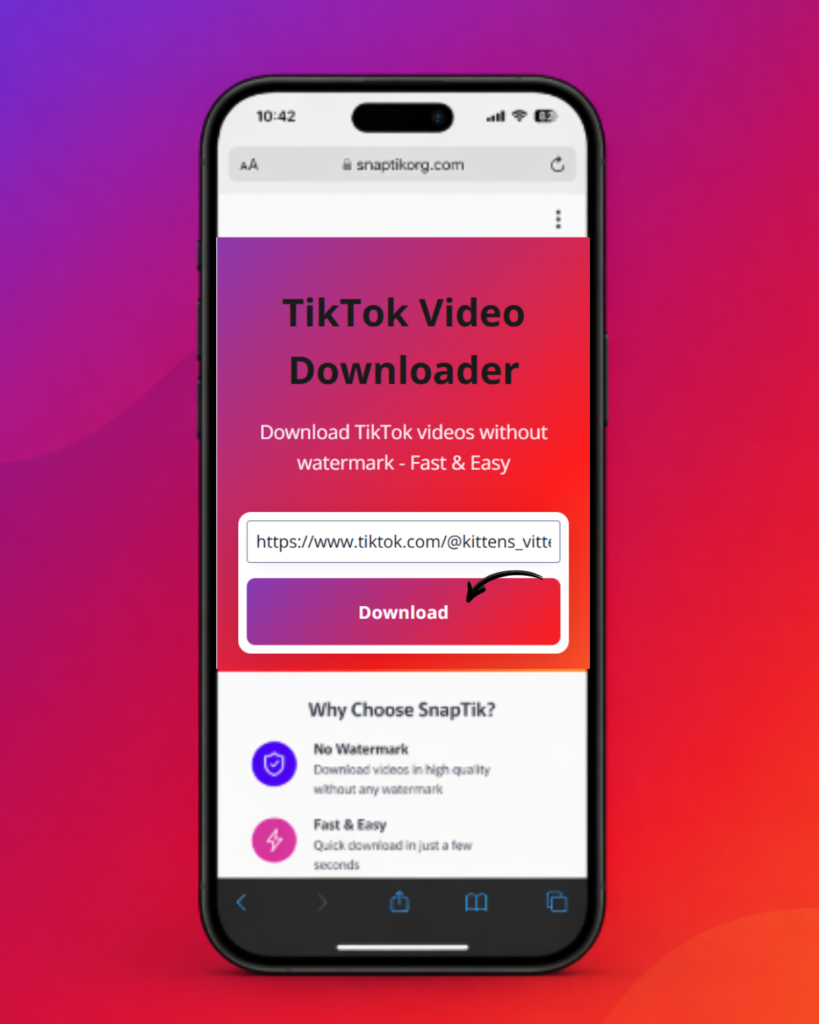
- Paste the link above and click Download
Banyak orang membuka halaman ini setelah mengetik “SnapTik” di Google. Ini adalah salah satu nama yang paling banyak dicari untuk menyimpan video TikTok, dan telah menjadi semacam istilah umum, seperti ketika orang mengatakan “Google saja” daripada “cari di web.” Halaman ini bukan layanan SnapTik resmi dan tidak memiliki hubungan apa pun dengan SnapTik, TikTok, atau ByteDance. Yang akan Anda temukan di sini adalah pengunduh TikTok independen berbasis browser yang dibuat untuk melakukan fungsi yang sama, yaitu menyimpan video TikTok publik tanpa watermark, disertai penjelasan yang benar-benar bermanfaat tentang bagaimana seluruh prosesnya bekerja, apa yang bisa dan tidak bisa dilakukan, serta cara mengatasi masalah ketika proses download tidak berhasil.
Alat pengunduh berada di bagian atas artikel ini. Semua yang ada di bawah ini dibuat untuk membantu Anda menggunakannya dengan baik: petunjuk langkah demi langkah, informasi kompatibilitas perangkat, penjelasan mengenai keamanan dan legalitas, masalah umum yang mungkin terjadi, serta perbandingan dengan cara lain yang digunakan orang untuk menyimpan video TikTok.
Apa Itu SnapTik, dan Apa Alat Ini?
SnapTik adalah nama dari sebuah situs web pihak ketiga khusus untuk mengunduh video TikTok. Karena merupakan salah satu alat pertama dan paling banyak dibagikan untuk tujuan ini, nama tersebut akhirnya melekat di benak banyak orang sebagai istilah singkat untuk “situs apa pun yang menghapus watermark TikTok.” Itulah sebabnya banyak pencarian seperti “snaptik”, “snap tik”, “snaptik download”, atau “snaptik app” sebenarnya hanya dilakukan oleh orang-orang yang mencari pengunduh video TikTok yang berfungsi dengan baik, bukan selalu merek tersebut secara khusus.
Situs web ini menyediakan pengunduh independennya sendiri yang menjalankan fungsi utama yang sama: Anda memberikan tautan video TikTok publik, lalu alat ini mengembalikan file bersih tanpa logo yang menutupi video dan siap disimpan ke perangkat Anda. Alat ini tidak bergantung pada aplikasi resmi TikTok, tidak mengharuskan Anda masuk ke akun, dan tidak meminta informasi pribadi apa pun selain tautan video itu sendiri.
Secara teknis, pengunduh TikTok seperti ini bekerja dengan membaca data halaman publik di balik URL video TikTok, menemukan file media asli tanpa watermark yang disimpan di server TikTok, lalu menyediakan file tersebut agar dapat langsung Anda download. Sebaliknya, opsi “Save video” bawaan TikTok akan mengode ulang video dengan nama pengguna dan watermark yang sudah tertanam di dalamnya, yang justru merupakan hal yang ingin dihindari oleh sebagian besar orang saat mencari alat seperti ini.
Cara Download Video TikTok Tanpa Watermark
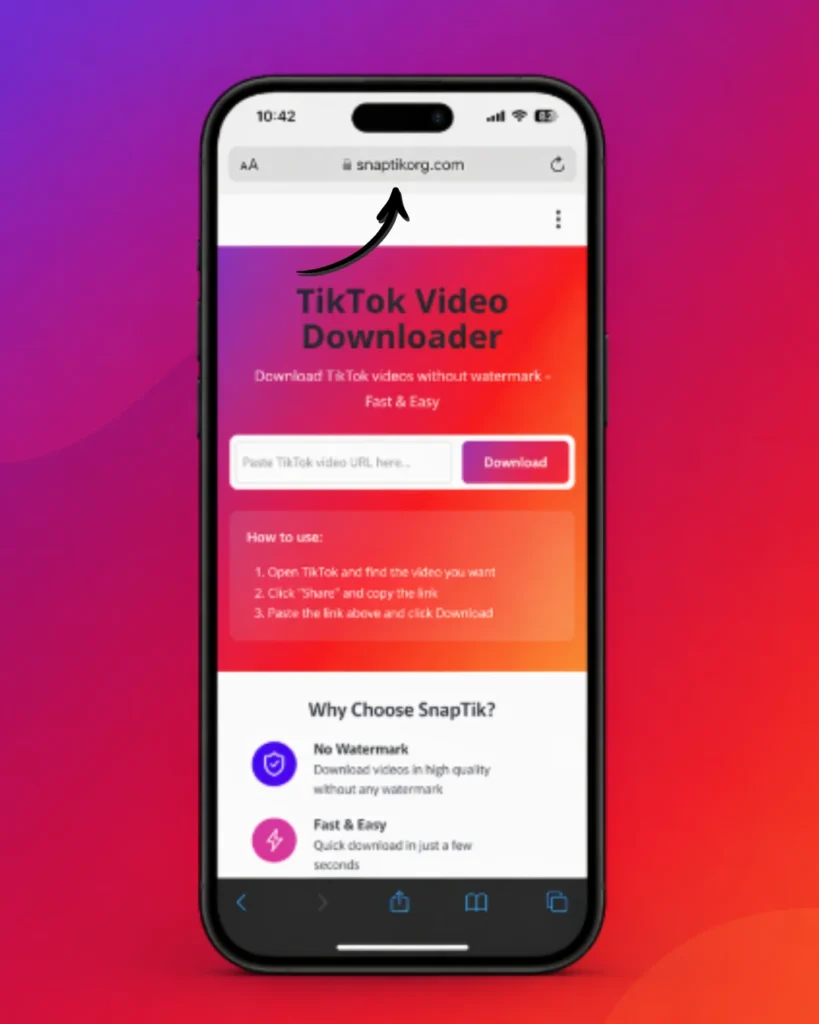
Prosesnya memang dibuat sesingkat mungkin. Caranya sama, baik Anda menggunakan ponsel maupun komputer.
Jika Anda hanya memiliki nama pengguna dan deskripsi video, bukan tautan yang telah disalin, Anda harus membuka video tersebut terlebih dahulu di aplikasi TikTok. Pengunduh tidak dapat memproses hasil pencarian, hanya URL video secara langsung.
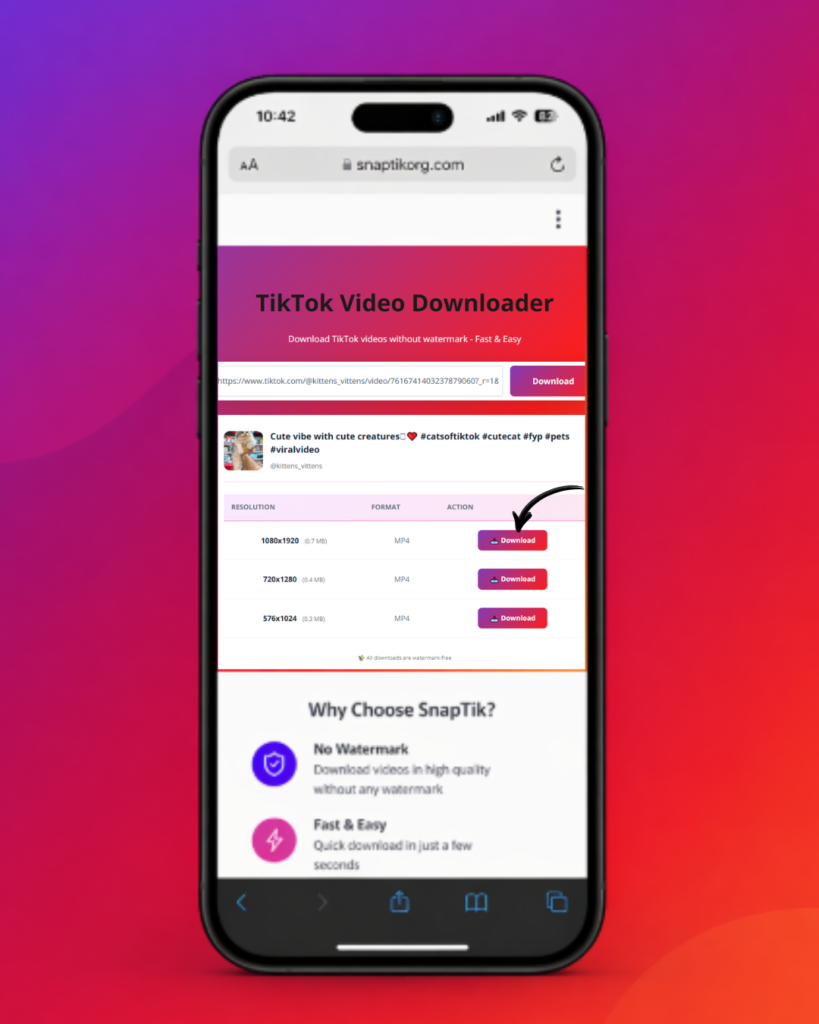
Download Tanpa Watermark: Kualitas, Format, dan Apa yang Sebenarnya Anda Dapatkan
Alasan utama orang mencari alat seperti ini daripada menggunakan opsi simpan bawaan TikTok adalah dua hal: watermark dan penurunan kualitas.
Satu hal yang perlu diketahui, “tanpa watermark” bukan berarti resolusi video akan meningkat melebihi kualitas asli yang dikodekan oleh TikTok. Jika kreator mengunggah video dalam resolusi yang lebih rendah, tidak ada pengunduh yang dapat menambahkan detail yang sejak awal memang tidak ada.
Apakah Anda Perlu Menginstal Aplikasi, atau Situs Web Ini Sudah Cukup?
Anda tidak perlu menginstal apa pun untuk menggunakan alat ini. Alat ini berjalan sepenuhnya di browser Anda. Tidak ada aplikasi yang perlu diunduh, tidak ada izin yang harus diberikan, dan tidak ada apa pun yang tertinggal di perangkat setelah Anda menutup tab.
Beberapa layanan memang menawarkan versi aplikasi khusus, dan bagi pengguna tertentu hal tersebut bisa menjadi pilihan yang masuk akal. Misalnya, jika Anda mengunduh puluhan video setiap hari dan menginginkan antrean download yang tetap atau riwayat offline. Namun, bagi sebagian besar orang yang hanya ingin menyimpan satu atau dua video, aplikasi justru menambah kerepotan (ruang penyimpanan, izin akses, dan pemberitahuan pembaruan) tanpa memberikan kemampuan tambahan yang berarti. Versi browser melakukan pekerjaan yang sama tanpa beban tersebut.
Perangkat dan Browser yang Didukung
Karena alat ini berjalan di browser web standar, bukan sebagai perangkat lunak bawaan, alat ini dapat digunakan secara konsisten di hampir semua perangkat modern:
Satu hal khusus yang perlu diperhatikan untuk iOS: Safari milik Apple terkadang memblokir tindakan langsung “Save to Photos” untuk file video yang diunduh melalui browser, tergantung pada versi dan pengaturan iOS. Jika proses download tampaknya sudah selesai tetapi Anda tidak dapat menemukan file tersebut, periksa aplikasi Files pada folder Downloads, atau coba buka tautannya menggunakan Chrome untuk iOS sebagai pengganti Safari, karena Chrome menangani proses download file dengan cara yang sedikit berbeda.
Apakah Pengunduh TikTok Seperti Ini Aman Digunakan?
Kekhawatiran mengenai keamanan biasanya terbagi menjadi tiga pertanyaan: apakah alat ini memerlukan login TikTok Anda, apakah alat ini menyimpan data Anda, dan apakah koneksinya sendiri aman.
Seperti halnya alat berbasis web lainnya, tindakan pencegahan yang umum tetap berlaku: hindari ekstensi browser atau aplikasi “downloader” pihak ketiga dari toko aplikasi tidak resmi yang meminta izin berlebihan, dan berhati-hatilah terhadap pengunduh TikTok yang meminta Anda login menggunakan kredensial TikTok. Pengunduh yang sah tidak pernah memerlukan hal tersebut.
Apakah Download Video TikTok Legal?
Ini memang merupakan topik yang memiliki banyak aspek, dan lebih baik dijelaskan secara langsung: legalitasnya bergantung pada apa yang Anda lakukan terhadap video tersebut setelah diunduh, bukan pada tindakan mengunduhnya itu sendiri.
Semua informasi ini bukan merupakan nasihat hukum. Jika Anda berencana menggunakan kembali konten TikTok milik orang lain untuk keperluan komersial atau publik, sebaiknya periksa peraturan yang berlaku di negara Anda dan, jika diperlukan, mintalah izin kepada kreator.
Masalah Umum dan Cara Mengatasinya
“URL Tidak Valid” atau tautan tidak dapat ditempel
Hal ini hampir selalu berarti bahwa teks yang disalin bukan merupakan tautan lengkap video TikTok. Pastikan Anda menggunakan Share > Copy Link langsung dari video yang dimaksud (bukan dari halaman profil atau hasil pencarian), lalu tempelkan tanpa menambahkan spasi atau teks apa pun sebelum maupun sesudah URL.
Download gagal atau halaman menampilkan server sedang sibuk
Biasanya ini merupakan masalah beban server sementara, bukan kesalahan di pihak Anda. Tunggu sekitar 30–60 detik lalu coba lagi. Jika masalah tetap terjadi setelah beberapa kali percobaan, coba gunakan browser lain untuk memastikan bahwa penyebabnya bukan cache lokal.
“Video tidak tersedia”
Video tersebut mungkin telah dihapus, diubah menjadi privat setelah tautannya dibagikan, atau dibatasi di wilayah Anda. Tidak ada pengunduh yang dapat mengatasi kondisi ini. Jika TikTok sendiri tidak menyediakan video tersebut secara publik, alat pihak ketiga mana pun juga tidak dapat mengambilnya.
Tombol tempel tidak berfungsi di perangkat seluler
Beberapa browser seluler mengharuskan Anda mengetuk kolom input terlebih dahulu sebelum opsi tempel muncul, atau Anda mungkin perlu memberikan izin clipboard saat pertama kali menggunakannya. Tekan dan tahan langsung di dalam kotak input, bukan di area di sekitarnya.
File yang diunduh tidak dapat dibuka atau diputar
Hal ini jarang terjadi, tetapi biasanya menunjukkan bahwa proses download terputus. Hapus file yang belum selesai tersebut lalu download kembali, karena file MP4 tidak dapat menangani proses penulisan yang tidak lengkap dengan baik.
Berfungsi di ponsel tetapi tidak di desktop (atau sebaliknya)
Hal ini sering kali disebabkan oleh konflik dengan ekstensi browser. Pemblokir iklan dan ekstensi privasi terkadang memblokir permintaan download itu sendiri. Coba nonaktifkan ekstensi untuk situs ini secara khusus, atau gunakan jendela pribadi/incognito sebagai pengujian cepat.
Perbandingan dengan Cara Lain untuk Menyimpan Video TikTok
Tidak ada satu pilihan yang “terbaik” untuk semua orang. Semuanya bergantung pada seberapa sering Anda mengunduh video dan apa yang Anda lakukan dengan file tersebut setelahnya.
|
Fitur |
Pengunduh Berbasis Browser (alat ini) |
Aplikasi Mandiri |
Simpan di Aplikasi TikTok |
|---|---|---|---|
|
Perlu instalasi |
Tidak |
Ya |
Tidak |
|
Watermark dihapus |
Ya |
Berbeda-beda tergantung aplikasi |
Tidak |
|
Berfungsi di iPhone/Android/PC |
Ya, di browser modern apa pun |
Bergantung pada dukungan sistem operasi |
Ya, tetapi dengan watermark |
|
Memerlukan login atau akun |
Tidak |
Terkadang |
Ya (akun TikTok) |
|
Format output umum |
MP4 (ekstraksi audio jika didukung) |
MP4, terkadang MP3 |
MP4 dengan watermark |
Untuk download sesekali, misalnya hanya beberapa video, alat berbasis browser seperti ini umumnya merupakan pilihan yang paling sederhana: tidak perlu instalasi, tidak perlu akun, dan cara kerjanya sama di perangkat apa pun yang Anda gunakan. Aplikasi khusus memang dapat menjadi pilihan yang masuk akal jika Anda mengelola proses download dalam jumlah besar secara rutin dan menginginkan fitur pengelolaan bawaan, tetapi kebutuhan tersebut jauh lebih jarang dibandingkan kebutuhan sebagian besar pengunjung halaman seperti ini.
Disclaimer
SnapTik adalah merek dagang dari pemiliknya masing-masing. Situs web ini menyediakan pengunduh TikTok independen dan tidak berafiliasi dengan, didukung oleh, maupun disponsori oleh SnapTik, TikTok, atau ByteDance.
Pertanyaan yang Sering Diajukan
Kesimpulan
Sebagian besar kebutuhan orang terhadap pengunduh TikTok sebenarnya sederhana: tempelkan tautan, dapatkan file yang bersih, tanpa watermark, tanpa akun, dan tanpa kerumitan. Itulah yang dilakukan oleh alat di bagian atas artikel ini. Sementara itu, informasi mengenai kompatibilitas perangkat, keamanan, legalitas, dan pemecahan masalah disediakan agar ketika sesuatu tidak berjalan sesuai harapan, Anda mendapatkan penjelasan yang jelas, bukan sekadar jalan buntu.