
TikTok Video Downloader
Download TikTok videos without watermark - Fast & Easy
How to use:
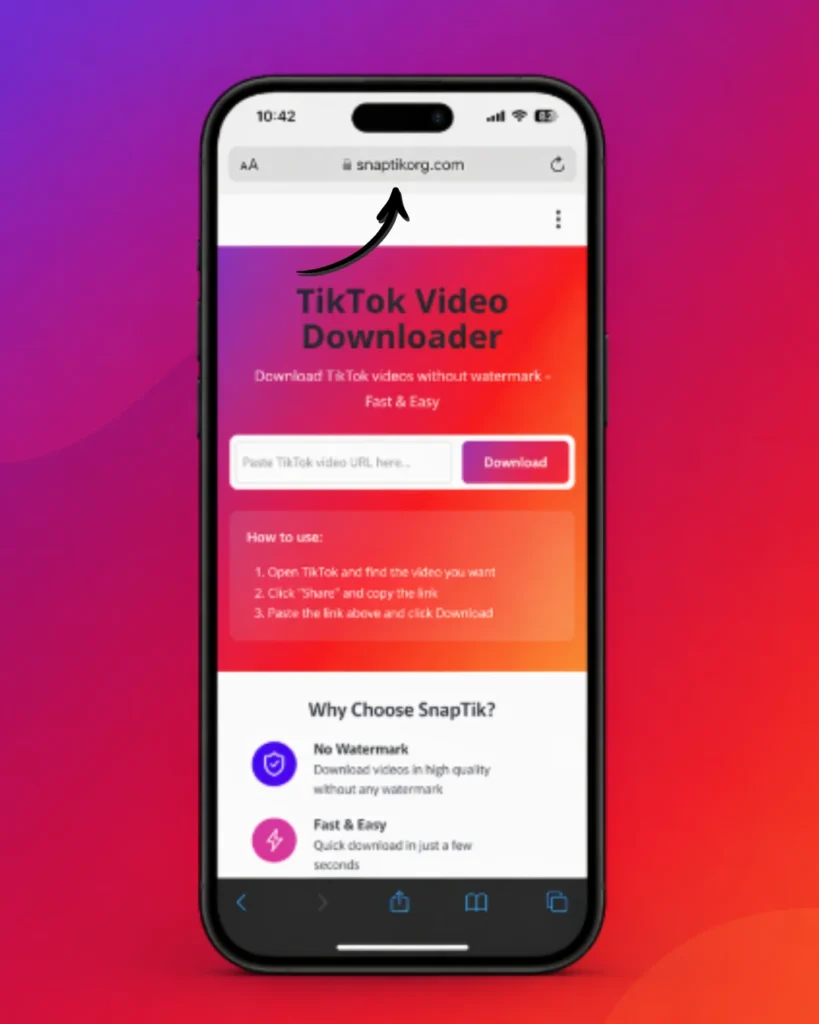
- Open TikTok and find the video you want
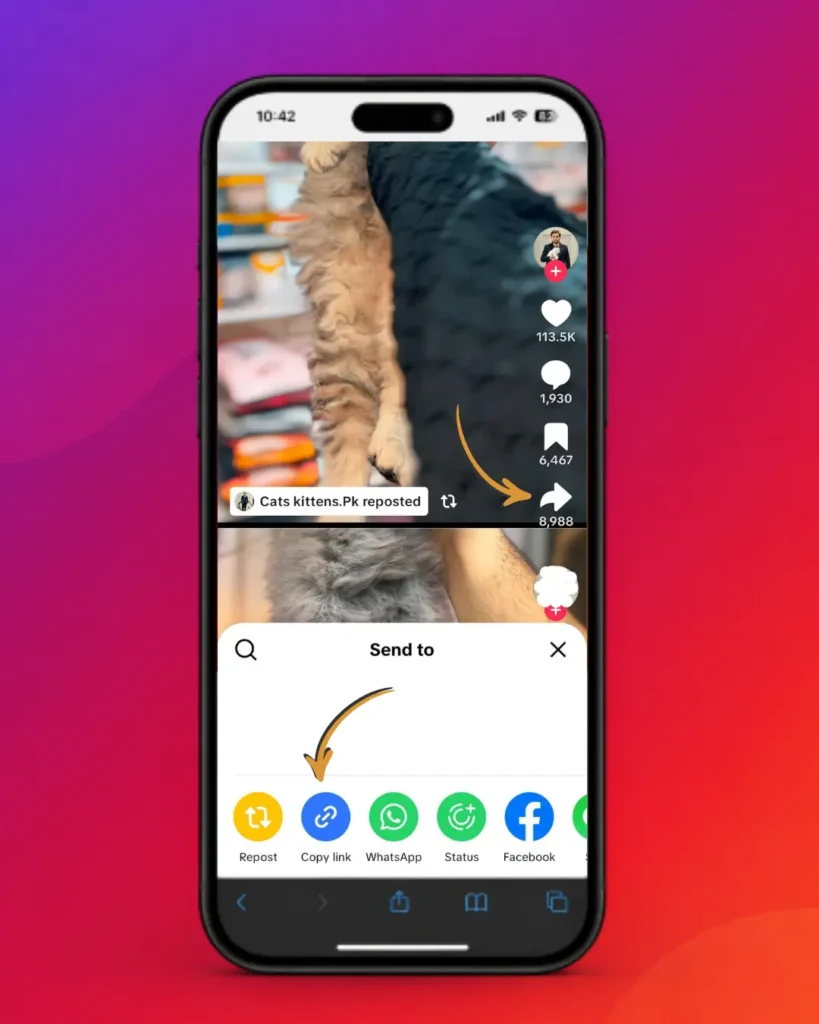
- Click "Share" and copy the link
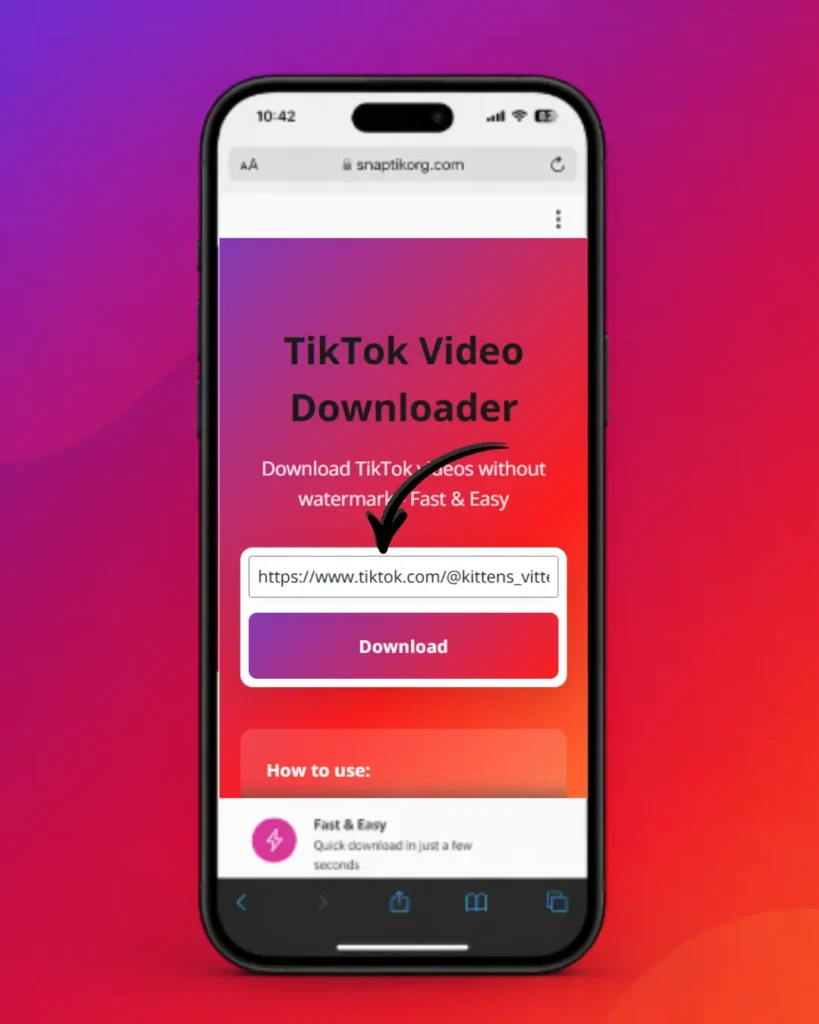
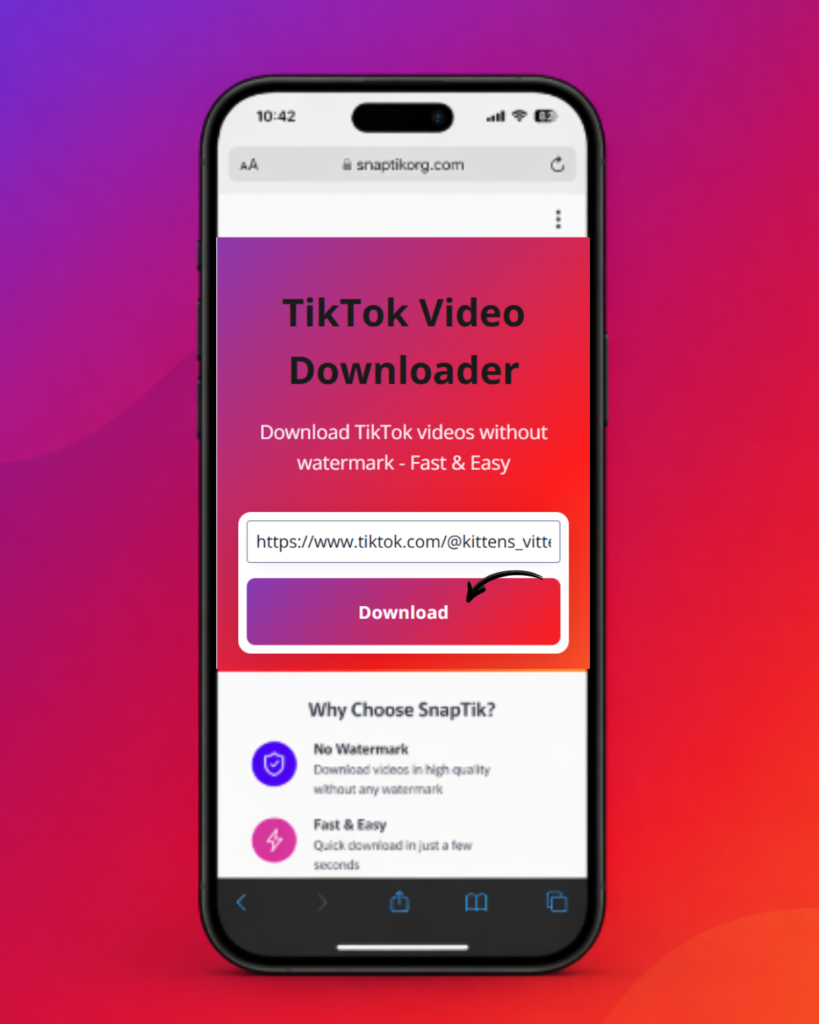
- Paste the link above and click Download
A lot of people land on this page after typing “SnapTik” into Google. It’s one of the most searched names for TikTok video saving, and it has become something of a generic label — the way people say “Google it” instead of “search the web.” This page is not the official SnapTik service, and it isn’t affiliated with SnapTik, TikTok, or ByteDance in any way. What you’ll find here is an independent, browser-based TikTok downloader built to do the same job — saving public TikTok videos without a watermark — along with a genuinely useful explanation of how the whole process works, what it can and can’t do, and how to fix things when a download doesn’t go through.
The downloader tool sits above this article. Everything below is meant to help you use it well: step-by-step instructions, device compatibility notes, safety and legality context, common failure points, and a comparison with other ways people save TikTok videos.
What Is SnapTik, and What Is This Tool?
SnapTik is the name of a specific third-party TikTok downloading website. Because it was one of the earliest and most widely shared tools of its kind, the name stuck in people’s heads as shorthand for “any site that removes the TikTok watermark.” That’s why so many searches for “snaptik,” “snap tik,” “snaptik download,” or “snaptik app” are really just people looking for a working TikTok video downloader — not necessarily that one specific brand.
This website provides its own independent downloader that performs the same core function: you give it a public TikTok video link, and it returns a clean file with no logo overlay, ready to save to your device. It doesn’t rely on TikTok’s official app, doesn’t require you to sign in, and doesn’t ask for any personal information beyond the link itself.
Mechanically, a TikTok downloader like this one works by reading the public page data behind a TikTok video URL, locating the original, unwatermarked media file that TikTok’s servers store, and offering that file back to you for direct download. TikTok’s own in-app “Save video” option, by contrast, re-encodes the clip with the username and watermark burned in — which is the exact thing most people are trying to avoid when they search for tools like this.
How to Download TikTok Videos Without a Watermark
The process is short by design. It works the same way whether you’re coming from a phone or a computer.
If you only have a username and a video description rather than a copied link, you’ll need to open the actual video in the TikTok app first — downloaders can’t resolve a search query, only a direct video URL.
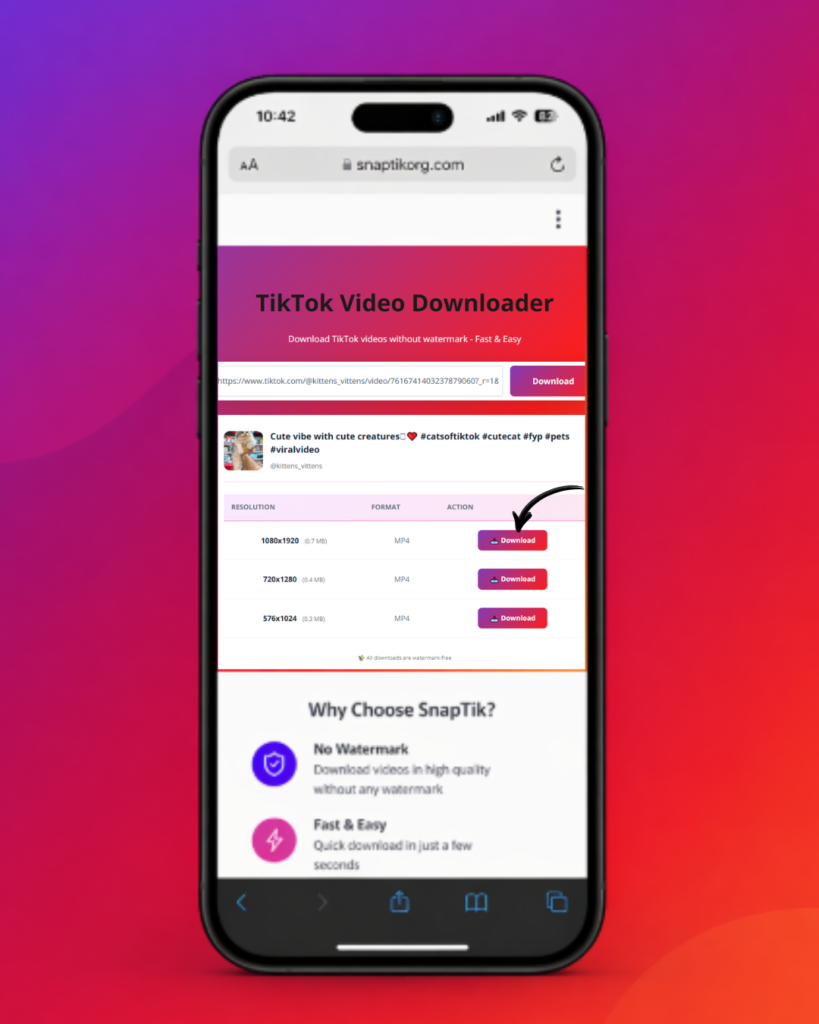
Downloading Without Watermark: Quality, Formats, and What You Actually Get
The main reason people look for a tool like this instead of using TikTok’s built-in save option comes down to two things: the watermark, and quality loss.
One nuance worth knowing: “no watermark” doesn’t mean the resolution is magically upgraded past what TikTok originally encoded. If a creator uploaded in a lower resolution, no downloader can add detail that was never captured.
Do You Need an App, or Does the Website Work on Its Own?
You don’t need to install anything to use this tool. It runs entirely in your browser — there’s no app to download, no permissions to grant, and nothing left behind on your device after you close the tab.
Some services do offer a dedicated app version, and for certain users that’s a reasonable choice — for example, if you’re downloading dozens of videos a day and want a persistent download queue or offline history. But for the vast majority of people who just want to save a video or two, an app adds friction (storage space, permissions, update prompts) without adding real capability. The browser version does the same job with none of the overhead.
Supported Devices and Browsers
Because the tool runs in a standard web browser rather than as native software, it works consistently across almost any modern device:
One iOS-specific detail worth flagging: Apple’s Safari sometimes blocks a direct “save to Photos” action for browser-downloaded video files, depending on iOS version and settings. If a download seems to “finish” but you can’t find the file, check your Files app under Downloads, or try opening the link in Chrome for iOS instead of Safari, which handles file downloads slightly differently.
Is a TikTok Downloader Like This Safe to Use?
Safety concerns here usually break down into three separate questions: does it need your TikTok login, does it store your data, and is the connection itself secure.
As with any web tool, the usual common-sense precautions still apply: avoid browser extensions or third-party “downloader apps” from unofficial app stores that ask for excessive permissions, and be skeptical of any TikTok downloader that asks you to log in with your TikTok credentials — a legitimate downloader never needs that.
Is Downloading TikTok Videos Legal?
This is genuinely a nuanced area, and it’s worth being direct rather than reassuring: the legality depends on what you do with the video afterward, not on the act of downloading itself.
None of this is legal advice, and if you’re planning to reuse someone else’s TikTok content commercially or publicly, it’s worth checking the specific rules that apply in your country and, where relevant, getting the creator’s permission.
Common Problems and How to Fix Them
“Invalid URL” or the link won’t paste
This almost always means the copied text isn’t a full TikTok video link. Make sure you used Share > Copy Link from inside the actual video (not a profile page or search results link), and paste it without adding extra spaces or text before/after the URL.
Download fails or the page says the server is busy
This is typically a temporary load issue rather than something wrong on your end. Wait 30–60 seconds and try again. If it persists across several attempts, try a different browser to rule out a local caching issue.
“Video unavailable”
The video may have been deleted, set to private after the link was shared, or restricted in your specific region. None of these can be worked around by a downloader — if TikTok itself won’t serve the video publicly, no third-party tool can retrieve it either.
The paste button does nothing on mobile
Some mobile browsers require you to tap the input field first before the paste option appears, or you may need to grant clipboard permission the first time you use it. Long-press directly inside the box rather than near it.
Downloaded file won’t open or play
This is rare, but usually indicates an interrupted download. Delete the partial file and re-download rather than trying to repair it — MP4 files don’t tolerate partial writes well.
Works on phone but not on desktop (or vice versa)
This is often a browser extension conflict — ad blockers and privacy extensions occasionally block the download request itself. Try disabling extensions for this site specifically, or use a private/incognito window as a quick test.
How This Compares to Other Ways of Saving TikTok Videos
There’s no single “best” option for everyone — it depends on how often you’re downloading and what you’re doing with the files afterward.
|
Feature |
Browser-Based Downloader (this tool) |
Standalone Apps |
In-App TikTok Save |
|---|---|---|---|
|
Installation required |
None |
Yes |
None |
|
Watermark removed |
Yes |
Varies by app |
No |
|
Works on iPhone/Android/PC |
Yes, any modern browser |
Depends on OS support |
Yes, but watermarked |
|
Login or account needed |
No |
Sometimes |
Yes (TikTok account) |
|
Typical output format |
MP4 (audio extraction where supported) |
MP4, sometimes MP3 |
MP4 with watermark |
For occasional downloads — a handful of videos here and there — a browser-based tool like this one is generally the simplest path: no installs, no accounts, and it works the same way regardless of which device you happen to be on. Dedicated apps can make sense if you’re managing a large, recurring download workflow and want built-in organization, but that’s a smaller use case than most visitors to a page like this actually have
Disclaimer
SnapTik is a trademark of its respective owner. This website provides an independent TikTok downloader and is not affiliated with, endorsed by, or sponsored by SnapTik, TikTok, or ByteDance.
Frequently Asked Questions
Conclusion
Most of what people need from a TikTok downloader is straightforward: paste a link, get a clean file, no watermark, no account, no hassle. That’s what the tool above this article does. The rest — device compatibility, safety, legality, and troubleshooting — is here so that when something doesn’t work the way you expect, you have an actual explanation rather than a dead end.