
TikTok Story Downloader
Download TikTok stories without watermark - Fast & Easy
How to use:
- Open TikTok and find the story you want
- Click "Share" and copy the link
- Paste the link above and click Download
SnapTik’s TikTok Story downloader is a free online tool that allows users to view TikTok stories anonymously and download them without any watermark before they disappear. Since TikTok stories automatically disappear after 24 hours, this tool helps you save important content before it gets removed permanently from the platform.
This story downloader supports multiple formats, including MP4, HD, and 4K video quality. Another advantage is that it works directly in your browser, meaning there is no need to install any app, plugin, or extension. You simply paste the TikTok story link into the tool to access and save content instantly.
What Is a TikTok Story Downloader?
A TikTok Story Downloader is an online tool designed to help users download TikTok stories without watermark before they expire. Unlike regular TikTok videos that remain available permanently, stories on TikTok are temporary and are only visible for 24 hours.
Because of this limitation, many users rely on a Story Downloader to preserve content they find useful, entertaining, or important.
With this TikTok Story Downloader, you can:
This TikTok Story Downloader works entirely inside your browser, so you do not need to download or install any additional software.
Why Download TikTok Stories?
In addition, many TikTok stories include watermarks, usernames, or creator branding when saved through normal methods. This is why users prefer a TikTok Story Downloader, especially when they want to preserve content for later use.
People commonly use a TikTok Story Downloader for the following purposes:
A TikTok Story Downloader simplifies this entire process by generating clean MP4 files that can be stored permanently on your device.
How to Use a TikTok Story Downloader
Unlike many tools that require complicated steps, SnapTik’s downloader is simple and only takes three steps:
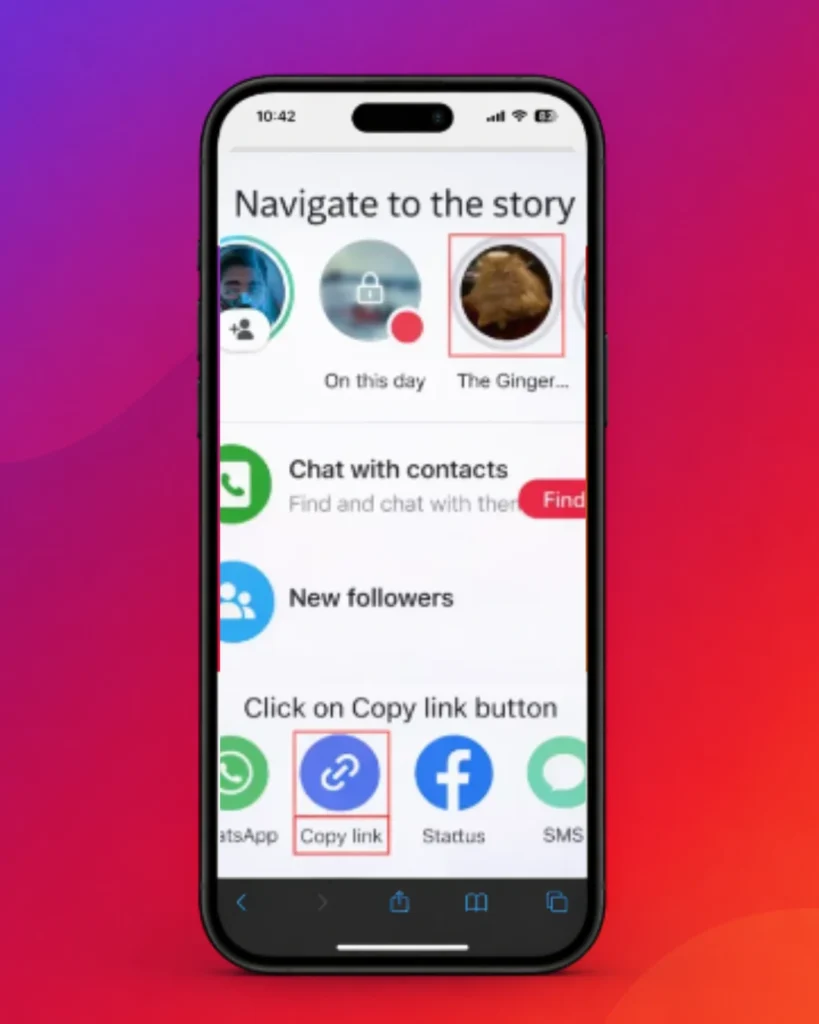
Step 1: Copy the Story Link
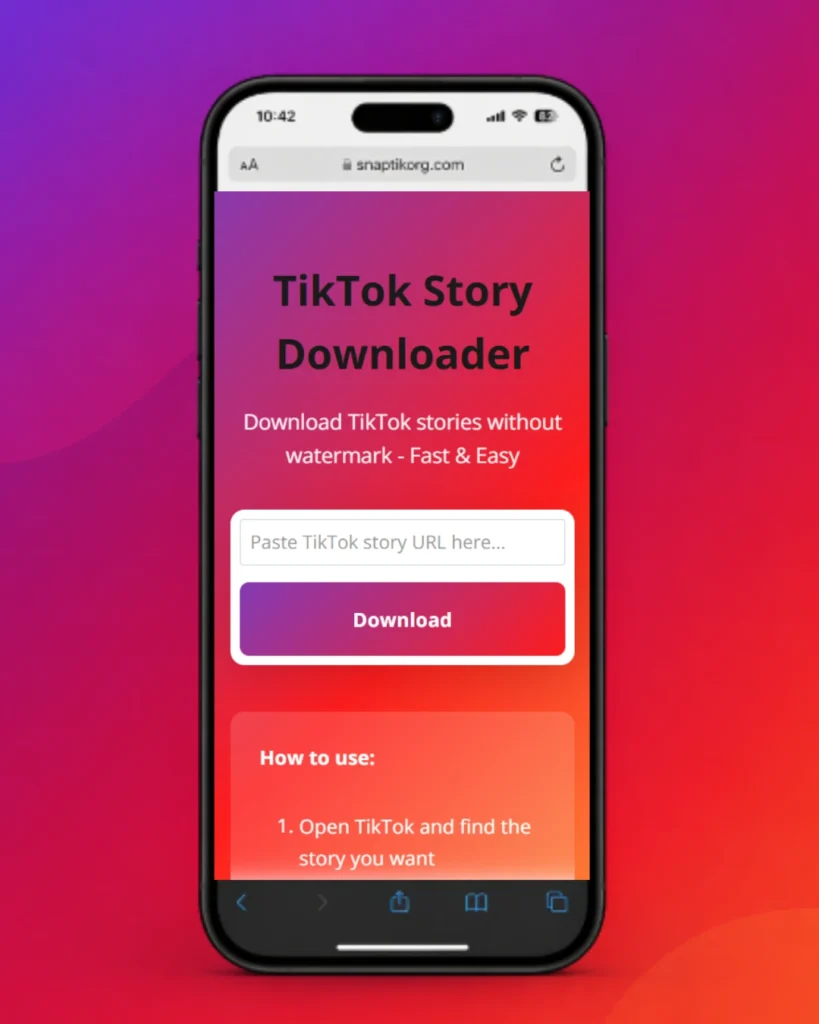
Step 2: Paste the Link
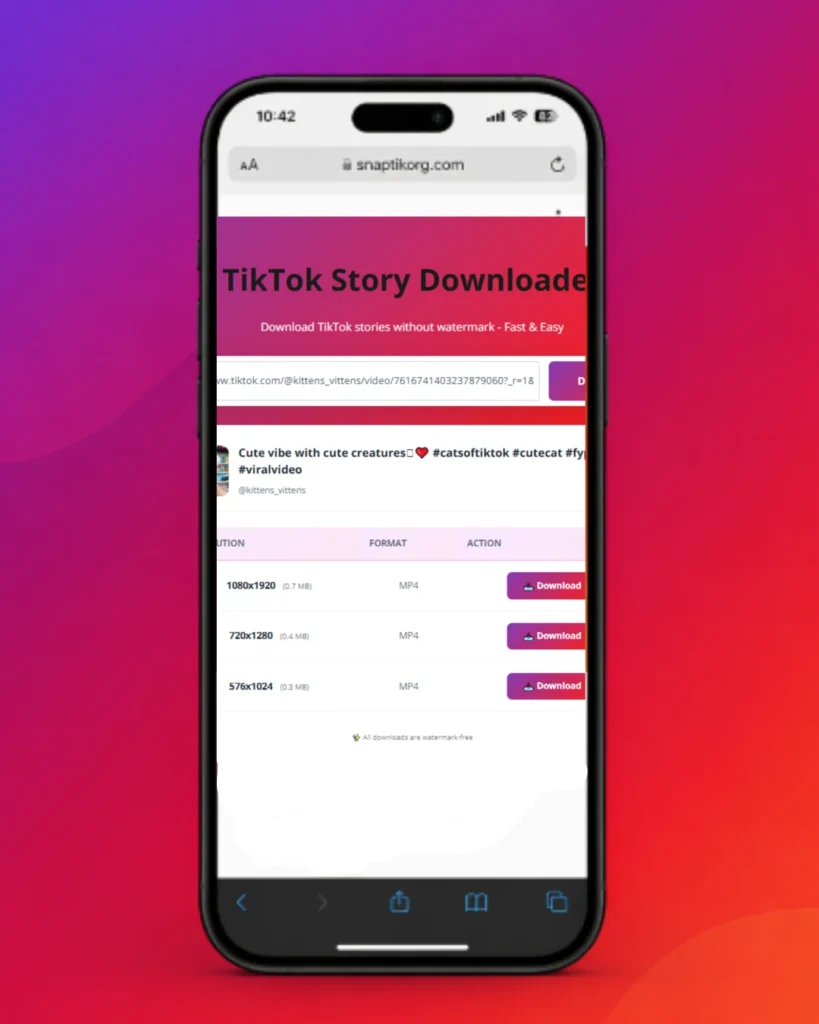
Step 3: Download the Story
Key Features of a Reliable TikTok Story Downloader
A good tt Story Downloader should provide speed, simplicity, and high-quality output. SnapTik includes all these essential features:
No Watermark Downloads
This Story Downloader removes all TikTok branding, including logos, usernames, and overlays, giving you a clean video output.
High-Quality MP4 Format
Users can download videos in MP4 format with HD and 4K resolution support. The TikTok Story saver ensures that video clarity and sharpness remain intact.
Cross-Platform Compatibility
The tool works smoothly on:
No Installation Required
Unlike apps that require installation, this Story Downloader tool works completely online in your browser.
Free and Unlimited Access
There are no hidden charges, subscriptions, or usage limits. You can use the TikTok Story Downloader as many times as you want.
Does SnapTik TikTok Story Downloader Work on iPhone?
Yes, it works perfectly on iPhone and iPad devices. Since it is browser-based, you can easily use it through Safari or any other mobile browser without installing any application. To download TikTok stories on iPhone:
After downloading, the file will appear in your device storage or Files app, where you can easily access and share it.
Is It Safe to Use a TikTok Story Downloader?
Safety depends on the platform you choose. A reliable tt Story saver should always prioritize user privacy and data protection. SnapTik’s Story saver is designed with privacy in mind and does not:
Instead, the system only processes publicly available links using secure HTTPS encryption. This ensures that your connection remains safe while using the TikTok Story saver.
SnapTik TikTok Story Downloader vs Normal TikTok Downloader
TikTok Story Downloader vs. regular TikTok downloader? Which is better? Let’s compare the two clearly.
Downloading Directly from TikTok
Using TikTok’s built-in download option often comes with limitations:
Using SnapTik TikTok Story Downloader
Using a Snaptik Story Downloader provides several advantages:
For users who want clean offline storage, a TikTok Story saver is a much better solution.
Supported Devices and Browsers
This Story Downloader is compatible with almost all modern devices and browsers.
Supported platforms include:
Supported browsers include Chrome, Safari, Firefox, and Edge. No installation is required.
Video Quality and Format Options
Depending on availability, the TikTok Story Downloader allows users to choose different video qualities such as:
All formats are compatible with smartphones, tablets, PCs, smart TVs, and media players.
Download Speed and Processing Time
One of the main advantages of this Story Downloader is fast processing speed. Once you paste the link, the system quickly retrieves and processes the video. Most downloads are completed within seconds, depending on internet speed.
Why Stories Disappear After 24 Hours
TikTok stories are designed for temporary sharing and automatically disappear after 24 hours. This is why users often use a TikTok Story Downloader to save:
Once downloaded, the content remains permanently stored on your device.
Privacy and Data Protection
We do not collect or store personal data. SnapTik works only with public links and does not track user activity.
Important Disclaimer
SnapTik is an independent tool and is not affiliated with TikTok. All content belongs to its original creators. Users are responsible for how they use downloaded content.
Frequently Asked Questions
Conclusion
SnapTik’s TikTok Story Downloader provides a simple and efficient way to save TikTok stories before they disappear. It supports multiple devices, offers watermark-free MP4 downloads, and requires no installation. With fast processing and easy usability, this Story Downloader helps users preserve content for offline access safely and conveniently.